
Docs
Pixel Flow user manual and best practices
Find scanning, filtering, image details, library, export, account, and industry workflow guidance by task.
Ecommerce Image Workflow: Procurement Checks, Listing Review, Competitor Analysis, and Performance Review
In ecommerce teams, images are never just “assets.” One image may first appear on a supplier page, then move into product setup sheets, store back offices, product feeds, detail pages, campaign pages, and review reports. If the source is lost, the specification is wrong, or versions are mixed up, the result becomes a chain of collaboration costs: operations has to find the image again, design may use the wrong asset, procurement has to ask the supplier again, and reviewers struggle to judge whether the image can continue to be used. So when you archive and organize ecommerce images, the hard part is not saving the file. The hard part is still being able to answer, after the image leaves the original webpage: which product it belongs to, which variant or specification it matches, which channel it is for, why it was selected at the time, and whether it can still move to the next step.
Pixel Flow can help with exactly these problems, and it is best placed near the front half of this workflow. While you are still doing procurement checks, listing review, competitor observation, or main-image performance review, you can collect page product images, campaign images, competitor images, and source clues first. Then, through filtering, previewing, favoriting, tags, Image Details, Download History, and table export, you can turn a batch of “similar-looking images” into work materials that can be handed off, reviewed, and traced later. Although Pixel Flow cannot decide which image will sell better for you, and it cannot obtain image authorization for you, it can solve one of the most easily overlooked and most collaboration-sensitive parts of ecommerce image flow: letting every important image move into the next workflow step with context.
Pixel Flow can help you organize product images, source pages, image URLs, dimensions, formats, alt text, tags, and download records, but it does not grant copyright, commercial usage rights, platform publishing permission, or training-data rights. Owned product images, supplier images, competitor images, buyer photos, creator images, stock-library images, and third-party platform images have different usage boundaries. Before public publishing, ad use, client delivery, or cross-platform reuse, confirm the authorization scope, platform rules, portrait rights, trademarks, and brand usage restrictions.
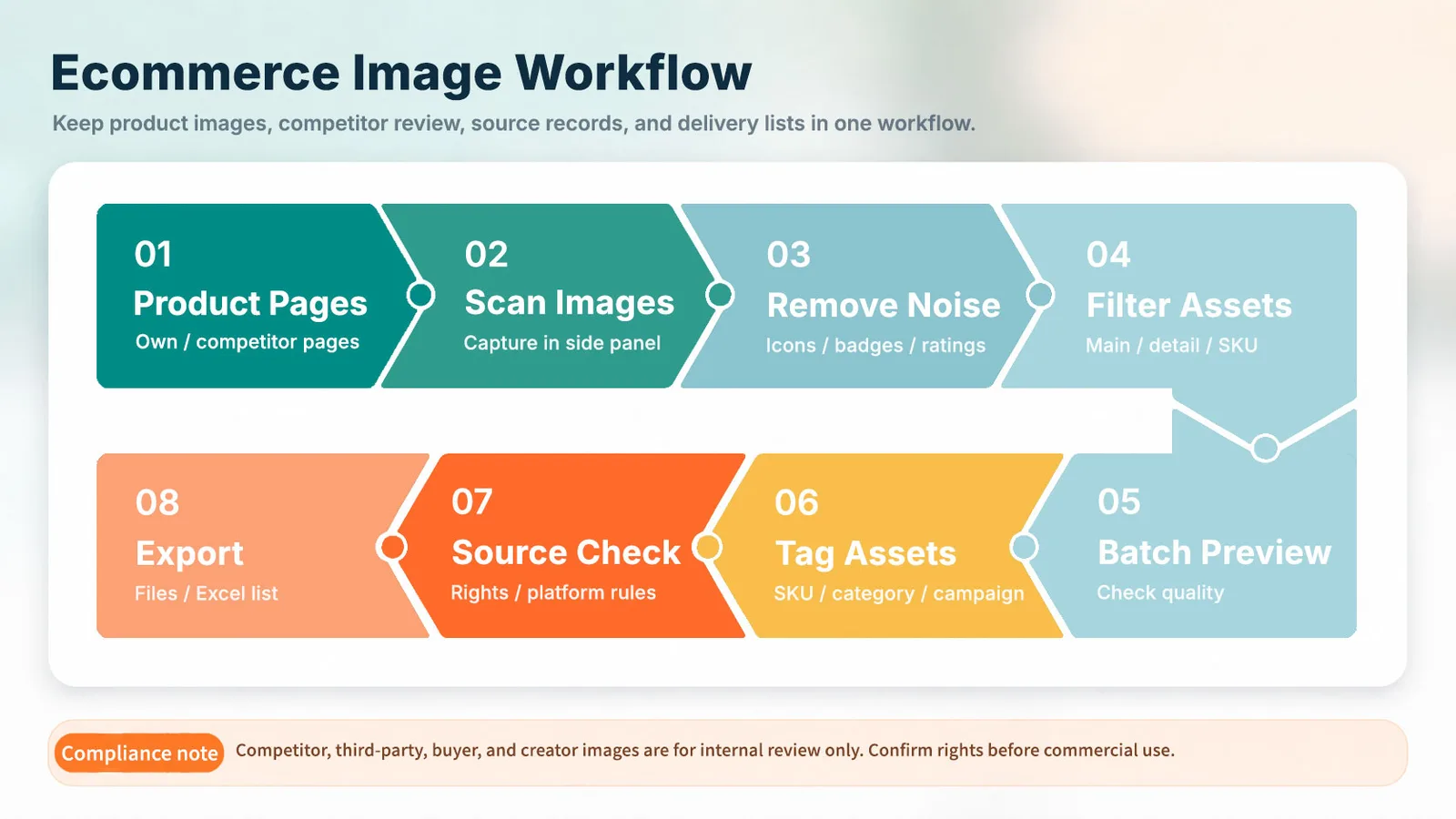
Ecommerce Image Scenarios and the Pixel Flow Workflow
Ecommerce images usually carry three jobs at the same time:
- Product data: main images, additional images, SKU images, and image URLs may enter product data, product feeds, store back offices, and distribution systems.
- Conversion assets: different main images, lifestyle images, detail images, and buyer photos can affect how users understand the product and whether they want to click.
- Compliance clues: source pages, authorization status, people, trademarks, watermarks, promotional text, and AI-generation markers can all affect whether the image can be published.
That is why simply “saving images” is not enough. You also need to know where the image came from, which product or SKU it belongs to, which channel it is for, whether it can currently be published, and who needs to confirm the next step.
Industry-rule note: Google Merchant Center treats the main image link as a required product-data field, distinguishes main images from additional images, and provides requirements for image format, dimensions, image links, variant images, promotional overlays, and AI-generated image metadata. Shopify product-media documentation also explains that product images may be used across the online store, sales channels, and different page locations, and may be generated into different size versions. Platform rules can change, so always follow the relevant platform back office and official rules before publishing.
You can use the table below to quickly locate your current business step: the left column describes where the workflow gets stuck, and the right column shows what kind of work material Pixel Flow can turn the webpage images into. Detailed steps for each scenario follow after the table if you need to read or follow them.
| Workflow Bottleneck | What Pixel Flow Can Help With |
|---|---|
| Operations requests and procurement checks: When operations or product developers see product images on webpages for procurement, price comparison, restocking, or further evaluation, they need to explain to procurement, “this is the product I mean.” The bottleneck is that images alone are often not enough. Both sides may struggle to confirm whether they are talking about the same SKU, color, model, bundle, or specification, and procurement may not have enough information to ask the supplier, place an order, or request missing materials. | Use Capture Page Images in Bulk to collect main images, SKU images, and other candidates. Then use filtering and Quick Preview to confirm which images are the target images. Batch Favorite the target images, add image tags to record supplier, SKU, color, model, and pending confirmation status, and finally download the image package with source and rights clues for procurement. Operations no longer hands procurement a single isolated image, but a set of main images, SKU images, and source clues that together explain the intended product. |
| Supplier webpage capture and listing material package preparation: When product developers plan to introduce a product from a supplier page into their own store or sales channel, they first need to organize webpage source images such as main images, SKU images, detail images, specification images, and packaging images from supplier pages, brand pages, product pages, or asset pages. The bottleneck is that supplier pages often contain many images, and product styles, colors, bundles, and specifications can easily get mixed together. Later, when listing the product in their own store, the team may not know which images to use, which need design work, and which information still needs supplier confirmation. | When images are already shown on supplier pages, brand pages, product pages, or asset pages, use Capture Feed to centralize page images into a candidate list. Then use Batch Favorite and Library and Export to organize by listing purpose, and use Export Excel Image Inventory to hand the materials to product developers, designers, or listing staff. The result is not just an archive, but a webpage-source material package that can support product setup, image processing, listing preparation, and review handoff. |
| Main image, SKU image, and detail image review: Operations needs to check whether the main image is clear, whether SKU images match colors and models, and whether detail images cover selling points, parameters, and specifications. The bottleneck is that thumbnails may be mistaken for high-resolution images, multi-specification images may be selected incorrectly, and main images, SKU images, and detail-page descriptions may not match. | Use Capture Feed to filter by dimensions, ratio, source, and specification. Then use Quick Preview or Basic Information to check width, height, format, source links, alt text, and compatible image URLs. Review no longer depends only on visual judgment; the team can use basic information and source clues to decide whether an image is ready for the next step. |
| Operations page image archiving and conversion-rate review preparation: During routine store checks, campaign checks, page revisions, or product image replacement, operations may not analyze click-through rate, conversion rate, favorites, add-to-cart, or ad performance right away, but they do need to record which images were shown on the page at the time. The bottleneck is that when a later review happens, the team may only have backend data, without the corresponding page image version and source. | On product pages, campaign pages, or live pages, use Capture Feed to collect the images shown on the page at the time. Put them into the library with Batch Favorite, then use Tag Management to mark product, page, campaign period, version, and pending review status. Later, when doing conversion-rate review, the business data can be matched with the image versions that were actually shown at the time. |
| Competitor image analysis: Operations, design, or marketing teams need to analyze image structure, visual order, and selling-point expression on competitor product pages, detail pages, or campaign pages. The bottleneck is that competitor observation materials can get mixed with owned publishable assets, which can lead to misuse later. | Use Batch Favorite to collect competitor images into the library. Use Tag Management to mark “competitor observation,” “internal reference only,” or “main image structure reference.” When exporting, keep source clues with Source and Rights Clue Records. This helps the team build competitor-analysis materials while keeping reference materials separate from publishable assets. |
| Main image performance comparison and traffic review: Operations needs to compare how different main-image versions perform in clicks, conversions, favorites, add-to-cart, or ads. The bottleneck is that review often leaves only business data, without knowing which image was used on the page at the time. If old image URLs are replaced, tracing becomes even harder. | Build a main-image version library in Library and Export. Use Tag Management to record product, channel, period, version, and review status. Then use Export Excel Image Inventory to output a main-image version list. Traffic data can then be matched with concrete image versions, so later discussions about “which image worked better” are not based only on memory. |
| Multi-channel material adaptation: A product has already appeared on a platform, independent store, supplier page, or brand page. Operations wants to sync it to other platforms, ad channels, social media, or distribution channels, so they need to collect product images from the existing webpage and hand them to design, ads, or listing staff for adaptation to the new channel. The bottleneck is that an image that shows the product on one page may not be suitable as another platform’s main image, ad image, or social cover. Dimensions, background, promotional text, crop space, image URL, and channel rules may all need to be confirmed again. | Use Capture Feed to collect candidates from the existing webpage. Use Batch Favorite to archive target images into the library, then open Image Details to confirm dimensions, format, and image URLs. Use Tag Management to mark target channel, processing status, and owner. Finally, use Export Image Inventory to hand the materials to design, ads, or listing staff. After the communication workflow is complete, operations gets not just “original platform images,” but a set of materials that can continue into cross-platform listing, editing, and integration. |
| Buyer photo, creator image, and user image screening: Operations or content teams may select real-use images from reviews, social media, creator collaborations, or campaign pages for reference, future authorization requests, or content review. The bottleneck is that image quality varies, portrait rights and authorization boundaries can be complex, and these images can easily get mixed with owned product images. | Use Tag Management to create separate tags such as “buyer photo,” “creator image,” “pending authorization confirmation,” and “internal reference only.” Combine them with Source and Rights Clue Records to keep source pages and usage reminders. This lets the team screen and prepare follow-up work without treating user or creator images as already publishable owned materials. |
| Ad and campaign material handoff: Operations sees product images, lifestyle images, combination images, or campaign visuals on product pages, supplier pages, live campaign pages, or competitor pages, and wants to hand them to design or ads as candidates for ad covers, campaign visuals, or social materials. The bottleneck is that the images come from different sources and have different usage boundaries. Some may continue into design processing, while others should only be observed internally. | Use Capture Feed to collect candidates from webpages. Use Batch Favorite to put them into the library, then use Tag Management to distinguish “owned asset,” “supplier asset,” “pending authorization confirmation,” “competitor observation,” and “internal reference only.” Finally, use Library and Export to hand materials to design or ads. Design receives a source-aware, status-aware material list, not a folder of image files with unclear boundaries. |
The table above covers the common bottlenecks and matching solutions in ecommerce image workflows. If you want to understand what Pixel Flow does in each step, continue below. The following 9 scenarios explain how these bottlenecks usually happen, what information needs to be checked, and how Pixel Flow turns webpage images into work materials that can be handed off and reviewed.
Scenario 1: Operations Requests and Procurement Checks
When operations or product developers see products they want to procure, compare, restock, or further evaluate on supplier websites, brand pages, product pages, or sample display pages, they often need to hand that product information to procurement. The easiest point of failure is whether both sides mean the same product. Images may look similar, while SKU, color, model, bundle, specification, packaging content, or supplier page details remain unclear. This becomes especially difficult when procurement receives only one image, or several images without distinguishing information, and then needs to ask the supplier, place an order, or request more material.
So in this scenario, you can handle it this way:
-
Open the supplier webpage first
Open the supplier website, brand page, product page, or sample display page, and manually confirm the product information you want procurement to check. -
Use Capture Feed to collect candidate images
Use Pixel Flow Capture Feed to collect candidate images from the current supplier webpage, such as main images, SKU images, packaging images, specification images, or detail images. -
Quickly lock onto the target images
In Pixel Flow Capture Feed, use filtering and Quick Preview to exclude logos, icons, decorative images, low-resolution thumbnails, and images unrelated to the current target. -
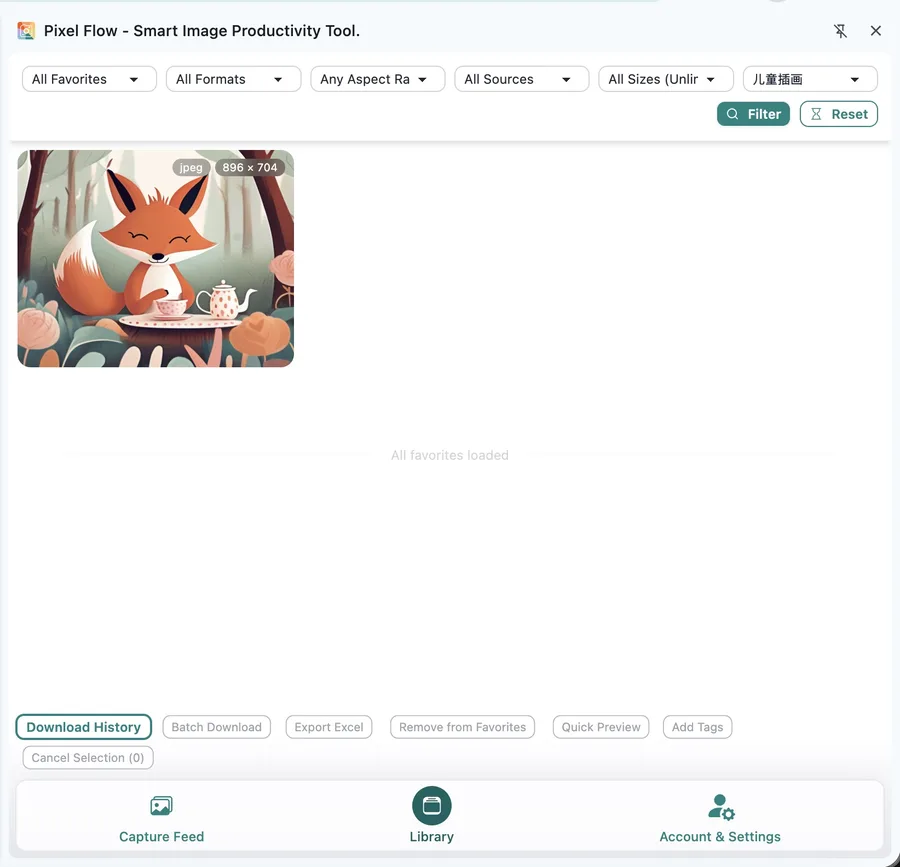
Favorite the target product images
After filtering, batch favorite multiple images that can explain the target product, and keep them ready for the next tagging step. (You can also favorite confirmed target images directly while using Quick Preview.) -
Add product status to favorited images
Add image tags to the favorited images to record supplier, product, SKU, color, model, and pending confirmation status. -
Download the image package with source clues
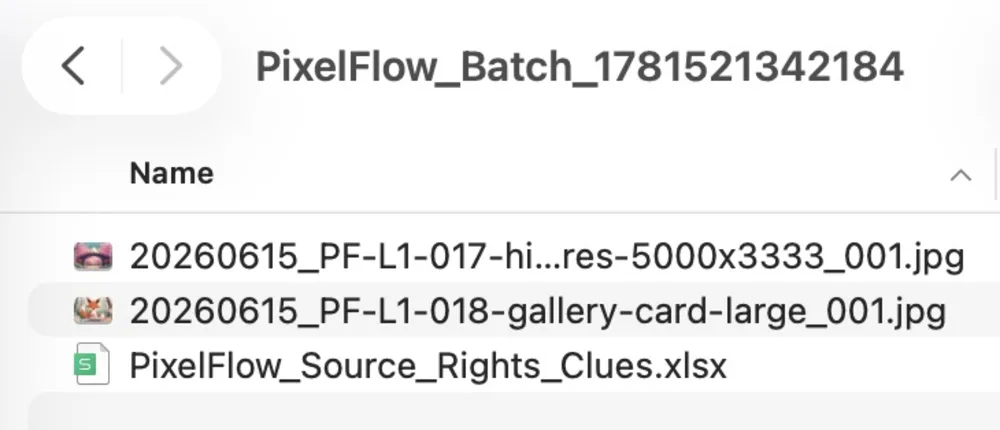
Batch download the collected product images as a ZIP package, and include the source and rights clue sheet during batch download. The downloaded package can then be handed to procurement for multi-dimensional checks around supplier information, quote, inventory, authorization, or ordering conditions.
At the end of this workflow completed with Pixel Flow, the package should explain at least three things: which product needs confirmation, which page the images came from, and which product clues the images correspond to. Procurement receives not just one isolated image, but a communication package containing main images, SKU images, packaging images, specification images, detail images, source pages, and pending confirmation status.
Scenario 2: Supplier Webpage Capture and Listing Material Package Preparation
This scenario means: when a product developer sees a product on a supplier page and plans to list it in their own store or sales channel, they need to organize the main images, SKU images, detail images, specification images, and packaging images already shown on the supplier webpage. These images will later be used for product setup, image processing, and listing preparation. In this workflow, Pixel Flow helps organize the target product images and source clues into a material package that the team can continue processing.
The purpose of this material package is very concrete: after the product developer organizes the target materials, they can continue marking how each image is intended to be used and who still needs to confirm it. For example, which images are suitable as main-image candidates, which images correspond to a color or bundle, which images can be handed to design for cropping or recreation, and which images still need supplier confirmation for authorization, specification, or packaging content. When later team members take over, they can continue based on these marks.
So Pixel Flow is not “generating complete product data” here. It is turning images that already exist on webpages into work materials with source, purpose, and status. The key is not ordinary archiving, but organizing supplier webpage images to the point where they can be handed off and used for further listing preparation:
-
Collect webpage images first
On supplier pages, brand pages, product pages, or asset pages, use Capture Feed to scan page images and get a candidate set from the same webpage or the same material source. -
Remove clearly unrelated images
Filter out logos, icons, decorative images, low-resolution thumbnails, and duplicates in Capture Feed, then use Quick Preview to review. This narrows the set from “all images on the page” to “product images that may be useful for listing preparation.” -
Favorite by listing purpose
Batch favorite target images such as main images, SKU images, detail images, specification images, and packaging images into the library. Later organization can then revolve around this set of favorited images. -
Add product clues and status
Add image tags to favorited images, such asmain image,SKU image,detail image,red variant, andpending product developer confirmation, so product developers, designers, or listing staff can understand each image’s purpose, specification clues, and current review status. -
Hand materials to the next team member
Use Library and Export or Export Image Inventory to output images and tables. This gives product developers, designers, or listing staff a webpage-source image inventory with source, purpose, tags, and review status for preparing their own store product materials.
Scenario 3: Main Image, SKU Image, and Detail Image Review
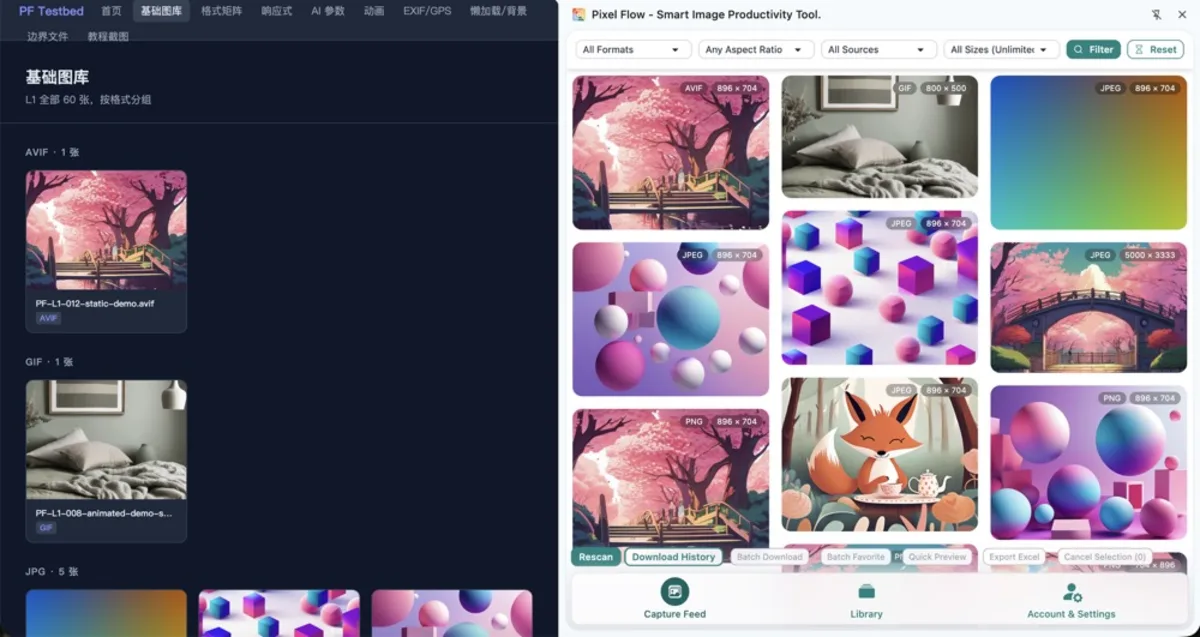
When product pages are live, pages are revised, campaigns are about to launch, or customers send feedback, operations often needs to review one question: do the main image, SKU image, and detail image currently shown on the page really match the current product and current specification? The bottleneck is not whether images exist. The images are already on the webpage, but the team is unsure whether they are clear, whether the wrong specification was selected, or whether an old detail image or low-resolution thumbnail is still being used.
This scenario is suitable for turning webpage images into a review checklist:
-
Collect current page images in Capture Feed first
Use Capture Feed to scan product pages, campaign pages, or live pages, and centralize the main images, SKU images, detail images, and thumbnails currently shown on the page. -
Filter noise by purpose and specification
Use filtering and Quick Preview to remove icons, button backgrounds, decorative images, low-resolution thumbnails, and duplicates. Keep the main images, color images, specification images, detail images, and selling-point images that may affect user judgment. -
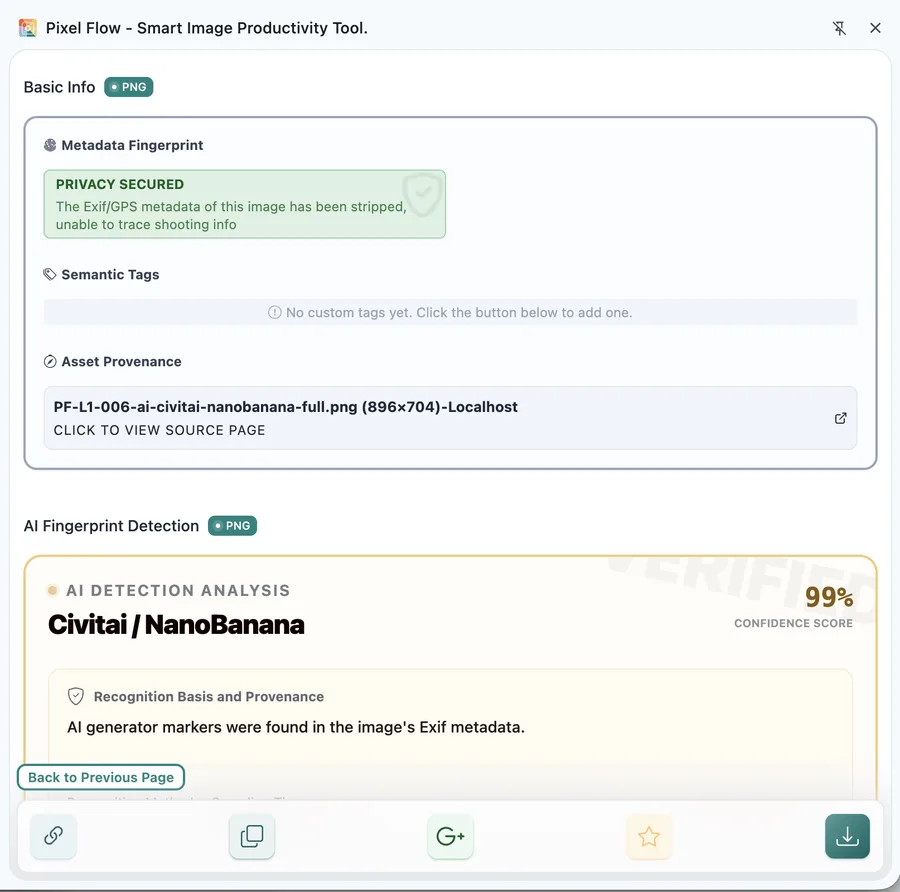
Open Image Details for basic information checks
In Image Details, review and confirm width, height, format, source page, alt text, and compatible image URLs. This helps operations turn “this image looks wrong” into more specific issues, such as “the red SKU uses a black variant image,” “the detail image still shows old parameters,” or “the page is showing a thumbnail instead of a high-resolution image.” -
Mark abnormal images and hand them off
After review, add tags such asneeds replacement,SKU mismatch,old detail image, orlow-resolution imageto abnormal images, then hand the list to product developers, designers, or listing staff for further processing.
Scenario 4: Operations Page Image Archiving and Conversion-Rate Review Preparation
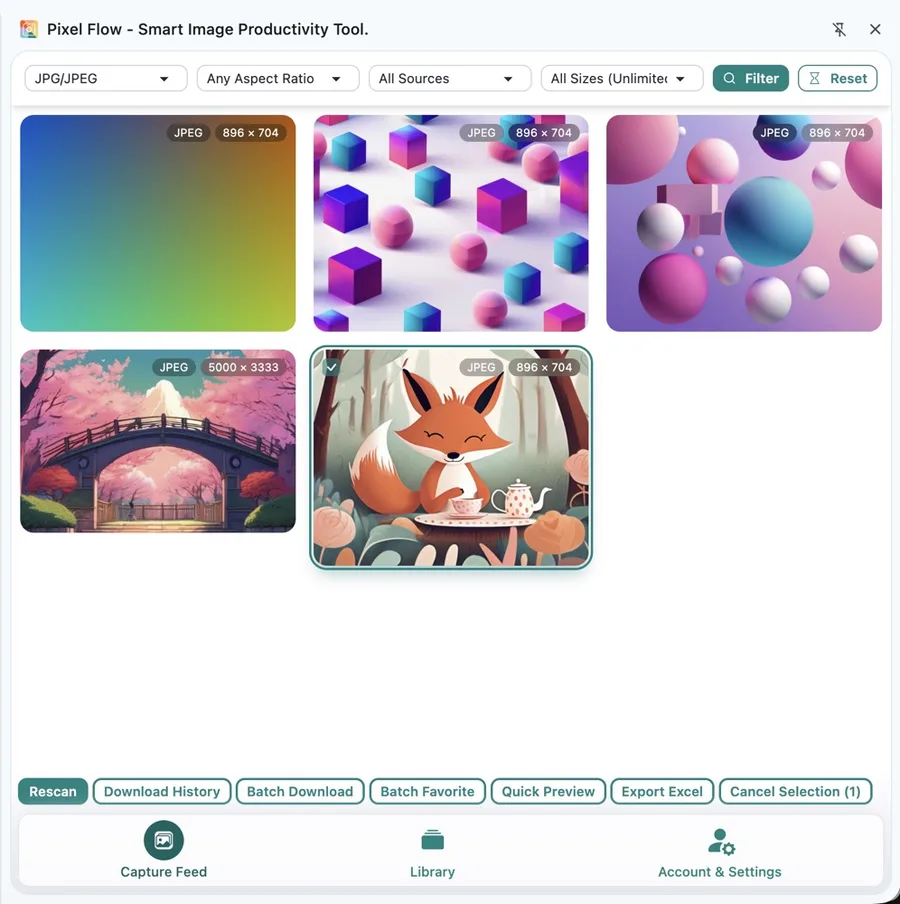
During routine store checks, campaign checks, page revisions, or product image replacement, operations may not need to analyze click-through rate, conversion rate, favorites, add-to-cart, or ad performance data immediately, but they do need to record the image information for each revision. Otherwise, when a later review happens, the backend may only contain data, without the image version and source that were shown at the time. This kind of quick organization after an image has gone live is exactly where Pixel Flow is useful:
-
Capture current images on the revised webpage
Open the product page, campaign page, or live page, and use Capture Feed to collect the images currently shown on the page. -
Filter out images that will not enter review
Remove icons, payment marks, button backgrounds, and unrelated decorative images. Keep only main images, carousel images, campaign images, detail images, or selling-point images that may affect user judgment. -
Favorite the page images that need archiving
Use Batch Favorite to put them into the library, so later review does not depend only on browser history, screenshots, or old pages that may have already been replaced. -
Use tags to record review clues
Use Tag Management to mark product, page, campaign period, image version, andpending reviewstatus. -
Review together with business backend data
Later, when analyzing click-through rate, conversion rate, favorites, add-to-cart, or ad performance, export the images together with source and clue information, then match them with backend data. When the team discusses “why this version got more clicks” or “why conversion dropped after changing the image,” they can return to the images that were actually shown at the time, not just the metric changes.
Scenario 5: Competitor Image Analysis
Competitor image analysis usually happens before new product planning, page revision, campaign planning, ad-material work, or daily operations discussion. Operations, design, or marketing teams need to analyze competitors and answer concrete questions: how do similar products use images to express selling points? What does the first image emphasize? Does the detail page introduce pain points first or parameters first? Why is the campaign page arranged in this visual order?
Pixel Flow is useful here for building a “competitor observation material package”: collect competitor main images, carousel images, detail images, and campaign images worth observing, tag them by observation purpose, and clearly mark which ones are internal reference only, so they are not later mistaken for publishable assets.
So in this scenario, you can handle it this way:
-
Open the competitor page to analyze
This may be a competitor product page, detail page, campaign page, brand page, or ad landing page. First clarify whether you are observing main-image structure, detail-page order, selling-point expression, bundle presentation, or campaign visuals. -
Use Capture Feed to collect page images
Use Capture Feed to collect main images, carousel images, detail images, campaign images, and lifestyle images from the competitor page. -
Favorite only images worth observing
Use Batch Favorite to favorite images with real analysis value. Exclude logos, icons, unrelated decorative images, and duplicates. -
Use tags to record the observation angle
Use Tag Management to add tags such ascompetitor observation,internal reference only,main image structure reference, anddetail page order reference. This lets the team know why the image was kept and reduces the chance of mistaking competitor images for owned publishable assets. -
Export source and observations for team discussion
Use Export Image Inventory to hand source, tags, and notes to design, operations, or marketing. During discussion, focus on first-image type, carousel order, selling-point expression, detail-page structure, and main-image differences across platforms.
Competitor images are generally suitable only for internal observation, breakdown, and discussion. They should not be assumed to be ready for secondary editing, design production, ad launch, or store publishing. If you later need to reuse, adapt, or publicly publish related images, confirm authorization scope, platform rules, and brand usage boundaries first.
Scenario 6: Main Image Performance Comparison and Traffic Review
Many operators care about one question: “Which kind of image works better?” But this question cannot be answered by visual judgment alone. White-background images, lifestyle images, model images, close-up detail images, and text-overlay selling-point images may perform differently across channels, categories, and audiences.
Although Pixel Flow cannot read ad backend or store backend traffic data for you, it can help preserve the status of “which image was used at the time.” So use Pixel Flow this way to build main-image version records:
-
Collect different main-image versions into the library
Favorite white-background images, lifestyle images, model images, close-up detail images, and text-overlay selling-point images into the Library. -
Use tags to record product, version, and channel
Use Tag Management to record product, SKU, channel, usage period, and main-image version, such asmain image A,main image B,lifestyle version,ad version, andpending review. -
Use Export Excel Image Inventory to generate a version table
Use Export Excel Image Inventory to output a main-image version list, organizing image source, dimensions, tags, and version information into a table that can be reviewed alongside business data. -
Return to the business backend to add performance data
In your store backend, ad backend, or data report, add click-through rate, conversion rate, favorites, add-to-cart, ad spend, and other data. Pixel Flow does not read these business metrics; operations needs to align them manually during review. -
Write down the follow-up conclusion
Based on image version and business data, record decisions such as keep, replace, continue testing, or only use for a certain channel. Later, when the team discusses “which image works better,” the discussion can return to specific image versions and performance data instead of relying on memory.
Scenario 7: Multi-Channel Material Adaptation
Multi-channel material adaptation usually happens after a product has already appeared on a platform, independent store, supplier page, or brand page. When operations wants to sync that product to other platforms, ad channels, social media, email, or distribution channels, they should not simply throw the original page images to the next team member. An image that works on the original platform detail page may not work as another platform’s main image, product ad, or social cover. Image dimensions, background, promotional text, crop space, image URL, and channel rules may all need to be confirmed again.
Pixel Flow fits in the front half of this communication workflow: collect, favorite, and tag product images from existing webpages first, then hand them to design, ads, or listing staff for editing, integration, or supplementation according to the target platform. After the workflow with the team runs smoothly, operations does not receive a batch of “images saved from the original page,” but a set of listing materials that other team members have adapted from the original platform page and that meet the requirements of other platforms.
So in this scenario, you can handle it this way:
-
Capture candidate images from existing product webpages
Open the platform page, independent store page, supplier page, or brand page where the product is already shown, and use Capture Feed to collect current webpage candidates such as main images, SKU images, detail images, lifestyle images, and campaign images. -
Favorite reusable target images
Use filtering and Quick Preview to exclude logos, icons, decorative images, low-resolution thumbnails, and unrelated images. Then batch favorite target images that may be used for other platform listings, ads, or content distribution into the library. -
Review basic image information for manual judgment
In Image Details, confirm dimensions, format, image URL, source page, and compatible image URL. -
Use tags to mark target channel and processing status
Add image tags to favorited images, such asPlatform A main image,independent store detail page,product ad,social cover,needs crop,needs replacement, andneeds design work. This helps later team members understand where each image is intended to be used and how it still needs to be changed. -
Export the inventory for next-step processing
Use Export Image Inventory to hand materials to design, ads, or listing staff so they can crop, revise, supplement, or integrate images according to the target platform. -
Let the team collaborate around the same list
Pixel Flow’s material organization ability lets operations, design, ads, and listing staff discuss, confirm, and modify around the same image inventory. After this workflow is complete, operations no longer receives a pile of original platform images, but a listing material package organized by channel purpose and further processed by the team.
Scenario 8: Buyer Photo, Creator Image, and User Image Screening
Buyer photos, creator images, social images, and review images often appear in review sections, creator collaboration pages, social media posts, and campaign pages. For sellers, operations, and content teams, these images are often valuable content assets: they reflect real usage scenarios, user concerns, product selling-point expression, and natural content presentation, and they may support later promotion, content review, or shooting-script planning. But because these images are usually scattered across different pages, accounts, and campaigns, with different quality, themes, sources, and processing status, organizing them can be very tedious. When they are needed later, they may be hard to find or distinguish.
Pixel Flow can help solve exactly this “worth keeping, hard to organize” problem. You can first use Pixel Flow to collect candidate images from webpages, then classify and tag them by buyer photo, creator image, social image, review image, content reference, pending contact confirmation, pending review, and other statuses. Later, when preparing promotional materials, doing content review, or planning shooting references, the team faces not scattered screenshots from many sources, but a set of user-content candidate materials with source, category, and processing status.
It is best to organize these images separately as a “user-content candidate list” rather than mixing them with owned product images:
-
Confirm where the images come from
Open review sections, creator collaboration pages, social media pages, or campaign pages, and use Capture Feed to collect candidate images. (During capture, Pixel Flow naturally keeps source page clues for the images.) -
Favorite only images worth continuing with
Favorite images that reflect real usage scenarios, user concerns, or content expression. -
Use tags to distinguish content type and processing status
Use Tag Management to mark statuses such asbuyer photo,creator image,social image,review image,content reference,pending contact confirmation, andpending review. -
Continue follow-up with source clues
Use Source and Rights Clue Records to keep source pages and usage reminders, making it easier to continue communication with users, creators, or partners. -
Export the candidate list for the content team
Use Export Image Inventory to hand images, sources, tags, and processing status to operations or the content team. Later, when preparing promotional materials, doing content review, or planning shooting references, the team can continue judging and following up around the same candidate list.
Authorization note: Before buyer photos, creator images, social images, or review images enter public publishing, ad launch, or store materials, separately confirm user authorization, creator authorization, platform permission, portrait rights, and third-party element boundaries. Pixel Flow can help organize source clues and processing status, but it cannot replace authorization confirmation or contract documents.
Scenario 9: Ad and Campaign Material Handoff
Ad and campaign material handoff usually happens before campaign scheduling, ad launch, social content production, or page revision. Operations first selects a batch of candidate images from owned product pages, supplier pages, brand pages, live campaign pages, or competitor pages, then hands them to design or ads for judgment: which can become ad covers, which are suitable for campaign visuals, which are only references, and which must be confirmed first.
The easiest confusion here is between “materials that can continue into design processing” and “reference images that can only be observed internally.” For example, owned product images may be cropped, have their background changed, or be used as campaign visuals. Supplier images may require authorization-boundary confirmation. Competitor images and third-party page images are usually internal references only and should not directly enter ad production. Pixel Flow’s role in this step is to explain candidates, sources, purposes, and authorization status first, so design or ads receives a material handoff package that can still be judged, not just a folder of image files.
Before handing materials to design or ads, you can handle it this way:
-
Collect ad or campaign candidates first
On owned product pages, supplier pages, brand pages, live campaign pages, or competitor pages, use Capture Feed to collect images that may become ad covers, campaign visuals, social materials, or design references. -
Favorite candidates into the library
Use Batch Favorite to put candidates into the library, so design or ads does not receive scattered screenshots, chat images, or files with unclear sources. -
Use tags to distinguish material boundaries
Use Tag Management to mark statuses such asowned asset,supplier asset,pending authorization confirmation,competitor observation,internal reference only, andbuyer photo pending authorization. -
Add source and purpose notes
Use Source and Rights Clue Records or an exported inventory to explain where the image came from, what it is intended for, and whether it can currently enter design processing. -
Hand materials to design or ads for further judgment
Finally, use Library and Export to hand the package to design or ads. They receive a material handoff package with source, purpose, and status notes, not a set of image files with unclear boundaries.

A General SOP
Whether you are doing procurement checks, listing review, competitor analysis, or performance review, you can reduce the workflow to the following 8 steps.
| Step | What You Do | Suggested Pixel Flow Feature |
|---|---|---|
| 1. Clarify the task | First decide whether the current task is procurement check, listing review, competitor analysis, performance review, or handoff | Plan a tag scheme first |
| 2. Capture images | Open a product page, supplier page, campaign page, or competitor page, and centralize page images | Capture Feed |
| 3. Remove noise | Remove icons, payment marks, button backgrounds, low-resolution thumbnails, and unrelated decorative images | Format, ratio, source, and specification filters |
| 4. Judge quickly | Compare clarity, subject, ratio, purpose, and whether images are worth keeping within the same candidate set | Quick Preview |
| 5. Favorite and archive | Put images that need review or later use into the library | Batch Favorite, Library and Export |
| 6. Add tags | Record product, SKU, campaign, channel, purpose, and review status | Add tags, filter by tags |
| 7. Check details | Confirm dimensions, format, source, alt text, and compatible image URLs for key images | Image Details |
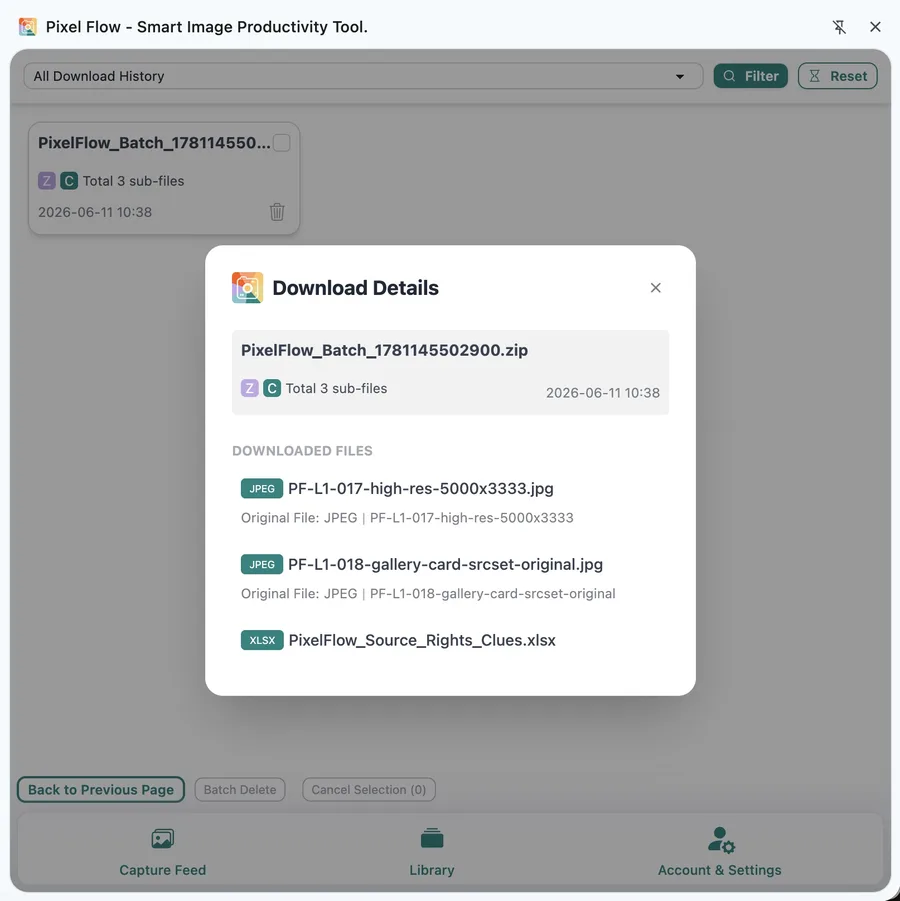
| 8. Handoff or review | Download images, export Excel, keep source clues and download history | Export Excel, Download History, Source and Rights Clue Records |
How to Design Tags
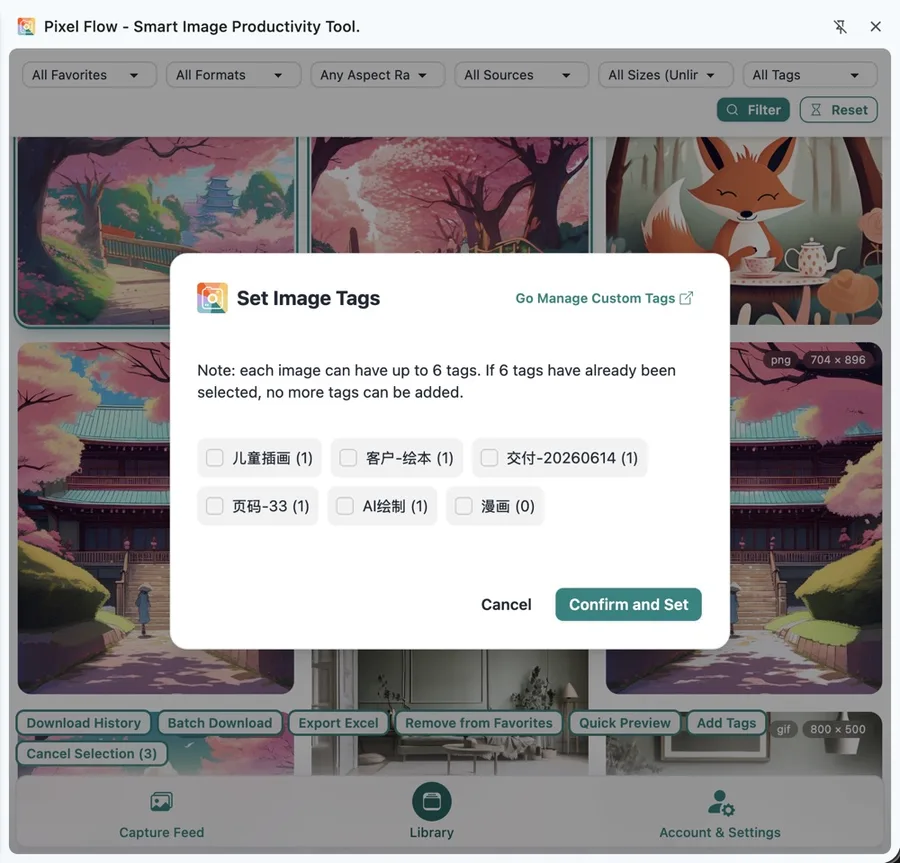
Do not only write “good image,” “backup,” or “competitor.” Ecommerce image tags should answer four questions: who does it belong to, where will it be used, can it currently be used, and who handles the next step.
| Tag Group | Examples |
|---|---|
| Product and SKU | SKU-2026-001, red variant, bundle A, packaging image |
| Purpose | main image, SKU image, detail image, specification image, campaign banner, ad candidate |
| Channel | independent store, platform store, product ad, social media, email |
| Status | pending product confirmation, pending authorization confirmation, legal review, owned asset confirmed, internal reference only |
| Review | main image A, main image B, 618 review, click-through comparison, needs replacement |
Industry References for Ecommerce Image Organization
The references below come from platform rules, web technical documentation, and ecommerce image research. They are not standards defined by Pixel Flow. They are included to help you understand why ecommerce images often need to preserve dimensions, formats, image URLs, alt text, source pages, and metadata clues.
| Information Type | What It Suggests for Ecommerce Images | Reference |
|---|---|---|
| Main and additional product images | Product data often distinguishes main images from additional images; image links, format, dimensions, subject display, and variant matching can affect product data quality. | Google Merchant Center: image_link, additional_image_link |
| Multi-size product media | Product images can appear in different page locations and sales channels; systems may generate different size versions, and the same image does not necessarily have only one display specification. | Shopify Product media types |
| Responsive images | Webpages can use srcset, sizes, and picture to provide image versions for different screens or slots. | MDN: Using responsive images in HTML |
| Alt text | Alt text should express the information an image conveys; on product pages, it can be a review clue for product name, color, model, or scene. | W3C WAI: Informative Images |
| Product image quality and ranking | Ecommerce research also treats product image quality, quantity, ordering, and violation detection as catalog quality problems. | A Smart System for Selection of Optimal Product Images in E-Commerce |
| User images and purchase decisions | User review images can affect purchase judgment in fashion ecommerce, so platforms may focus on user image quality and ranking. | Product Review Image Ranking for Fashion E-commerce |
| Ad lifestyle images | Product catalog images are not always attractive when used directly in ads; some research discusses staging product images and generating ad materials. | Staging E-Commerce Products for Online Advertising |
These references can help you understand the industry background, but they do not replace platform back-office review, internal company rules, contract authorization, or legal judgment.
Compliance Boundaries
Capture, favorite, download, export, and review records are not usage authorization. Pixel Flow can help preserve source clues for product images, competitor images, campaign images, user images, and third-party page images, but those clues are internal organization, communication, and review materials.
Procurement checks, product setup, listing checks, competitor observation, campaign review, source tracing, and authorization review preparation.
Do not directly use competitor images, buyer photos, creator images, third-party product images, or unclear-source images in stores, ads, social posts, or client delivery.
Confirm supplier authorization, platform rules, portrait rights, trademarks, brand usage restrictions, image re-editing limits, and client usage scenarios.
What Materials Should Exist After Organization
After a round of ecommerce image organization, the ideal result should not be just a folder of images. It should be a set of work materials that can continue into handoff, review, processing, or retrospective analysis. Whether you are doing procurement checks, listing material preparation, competitor analysis, main-image review, or user-content screening, the final package should include at least these categories:
- Image files: screened product images, SKU images, detail images, campaign images, competitor observation images, user-content candidates, or channel-adaptation images.
- Source clues: source page, image URL, dimensions, format, alt text, capture time, and necessary metadata clues for each image. (Pixel Flow automatically keeps these image clues during capture and favoriting.)
- Tag status: tags that explain product, SKU, campaign, channel, purpose, review status, processing status, and usage boundary.
- Export materials: image ZIP packages, exported Excel image inventories, or source and clue sheets that procurement, product developers, design, ads, clients, or reviewers can continue processing.
- Flow records: Download History that can show when a batch of images was downloaded and whether it entered a delivery package, review material, or cross-team collaboration workflow. (When capturing, favoriting, and downloading in Pixel Flow, the corresponding operation time is automatically preserved.)
- Next action: ready to use, pending product information confirmation, needs design processing, replace with owned asset, reshoot, continue testing, internal reference only, or pending authorization confirmation. (This type of information is usually recorded with tags.)
Although different scenarios have different focus areas, the core problem Pixel Flow solves is shared: it improves the efficiency of organizing images, supplementing clues, and forming inventories, while also helping procurement, product developers, operations, design, ads, and listing staff collaborate around the same image materials. When later team members take over, they can more quickly understand where an image came from, where it is intended to be used, and what still needs confirmation, making the whole team workflow smoother.
Related Docs
- Capture Page Images in Bulk: best for first bringing images from product pages, supplier pages, campaign pages, or competitor pages into Capture Feed.
- Library and Export: best for long-term collection of selected images, project material organization, and team export.
- Export Image Inventory: best for organizing source, dimensions, format, tags, and review status into Excel for procurement, operations, design, or reviewers.
- Image Details: best for viewing an individual image’s dimensions, format, source, alt text, metadata, and download clues.
- Source and Rights Clue Records: best for understanding how Pixel Flow preserves source clues and how those clues differ from authorization files.
- Download History: best for checking whether a batch of images has been downloaded, when it was downloaded, and whether it entered a delivery package.
- Organize Favorited Images with Tags: best for building product, SKU, purpose, channel, and review-status tag systems.
- Responsible Use of Pixel Flow: best for confirming image usage boundaries before public publishing, ad launch, client delivery, or cross-platform reuse.