
Docs
Pixel Flow user manual and best practices
Find scanning, filtering, image details, library, export, account, and industry workflow guidance by task.
AI Image Dataset Curation: Screen, Tag, Keep Source Clues, and Review Rights
When you are preparing candidate images for internal research, labeling work, or an AI image dataset, the most important step is not downloading as many files as possible. It is first making clear where the images came from, why they were selected, whether they still need review, and who must confirm the usage boundary.
Pixel Flow fits the first half of a dataset-preparation workflow: find candidate images on the current page, filter by format, dimensions, source, and size, save useful items to the library, mark status with image tags, inspect technical clues in Image Details, and export an inventory for data, labeling, rights, legal, or project owners to review.
Pixel Flow does not decide whether an image can be used for model training, dataset distribution, commercial use, or resale. It provides candidate organization, source clue retention, and review clues. Whether an image can enter a dataset still depends on source website terms, authorization files, license text, likeness rights, privacy requirements, platform rules, and your team’s compliance process.
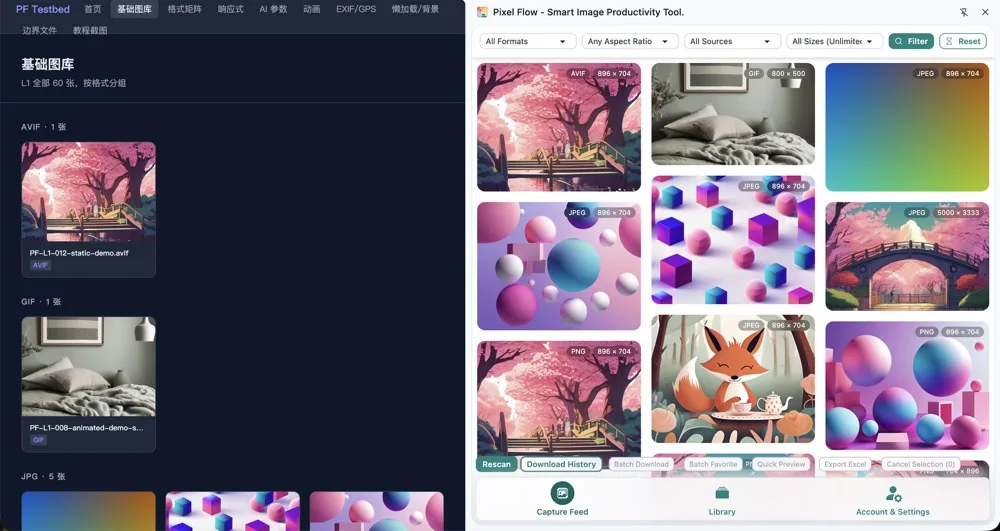
AI Image Curation Tasks Pixel Flow Fits
If your team already has a defined data task, labeling guideline, or rights-review process, Pixel Flow is best used for upstream organization: gather scattered web images into a candidate pool, remove clearly unsuitable items, and pass source, size, tag, and pending-review clues to the next owner. It is especially useful for image curation scenarios that are not yet final training datasets, but already require multiple people to make decisions.
Collect images that may enter a labeling task into one reviewable list.
Organize observation samples with similar style, category, composition, format, or source.
Remove tiny images, decorative images, duplicates, low-quality images, and images with unclear context.
Hand source pages, image URLs, tags, technical clues, and pending questions to the responsible reviewer.
In this article, “dataset” means the candidate image organization workflow. It does not mean the images have already been authorized for training. Treat Pixel Flow as a candidate-pool and review-inventory tool in data preparation, not as a rights-approval tool.
Suggested Workflow: From Candidate Screening to Rights Review
AI image dataset curation should not begin with batch download. A safer sequence is to build a candidate pool first, then move through quality pre-screening, tag-based handoff, source clue retention, and rights review. The workflow below places Pixel Flow in the first half of data preparation: it helps you make candidate images reviewable, while the final decision about entering a training dataset remains with data owners, rights owners, or legal reviewers.
- Open a page you are authorized to access and process, such as your own asset page, a client-provided page, a public reference page, or an internal page your team allows you to organize.
- Use Capture Page Images in Bulk to review images already rendered on the current page.
- In the capture feed, first remove avatars, icons, button backgrounds, ad images, placeholders, low-resolution thumbnails, and images that are clearly unrelated to the training set.
- Narrow the candidate range by image format, aspect ratio, source type, and size. Prefer images with clear source context, sufficient dimensions, complete content, and relevance to the task.
- Use quick preview to compare content quality, so images that only look usable as thumbnails do not enter the candidate pool.
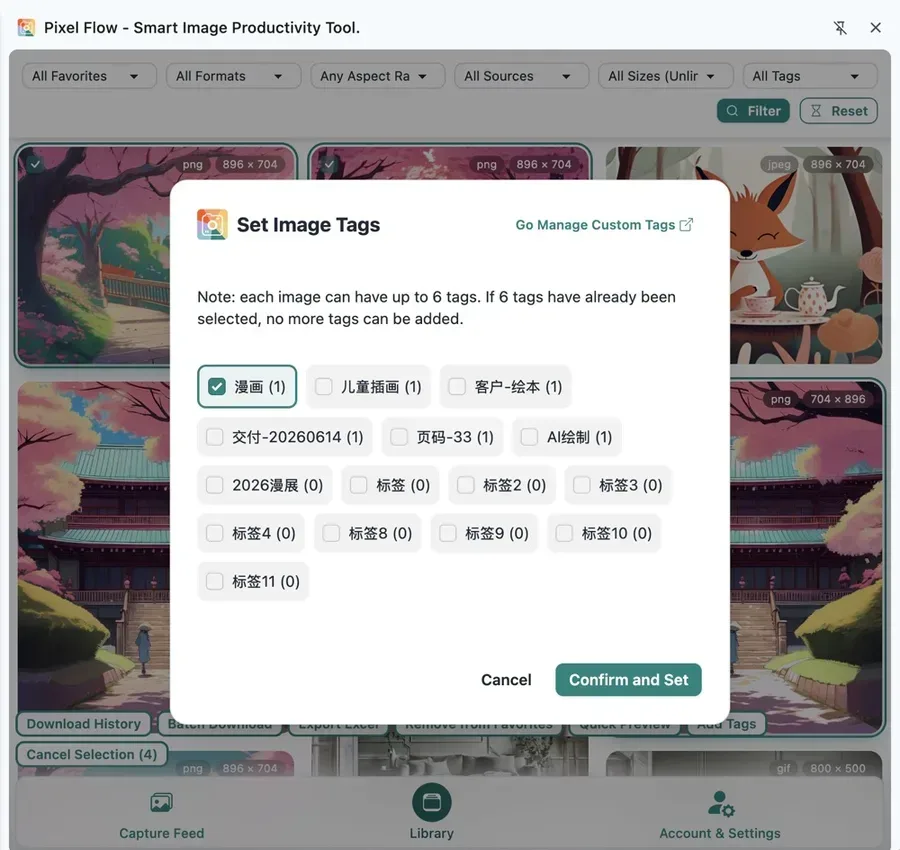
- Save images that need follow-up into the library.
- Add tags for project, content category, rights status, quality status, and review owner.
- Open Image Details to inspect dimensions, format, source page, image URL, Alt text, metadata, AI generation clues, and possible copyright/creator fields.
- First export an image inventory for team review. After the scope is confirmed, batch download and keep source records.
- Let the data owner, rights owner, or legal reviewer decide whether the image can enter the formal dataset based on source terms, authorization materials, and project use.
How to Screen Candidate Images
A dataset candidate pool should usually be smaller and clearer rather than large from the start. In general, image training or labeling candidates are first checked for several things: whether the image matches the target task, whether the subject is clear, whether size and clarity are sufficient, whether scenarios, angles, backgrounds, and resolutions cover the expected real-world environment, whether labels or annotations can be judged consistently by humans, whether training and test images are separated, and whether source, rights, privacy, and redistribution boundaries can be verified.
“High resolution” also does not simply mean “the larger the better.” Google Cloud image training guidance emphasizes that training images should be similar to the images expected at prediction time, with coverage across angles, resolutions, and backgrounds. AWS Rekognition Custom Labels also recommends images that are sufficiently large, bright, sharp, high-contrast, less occluded, and where the subject occupies a meaningful part of the image. In other words, dataset curation is not just about finding large images. It is about finding candidates that match the task, are visually clear, can be reviewed, and can move into later labeling or rights-review workflows.
| Common AI Image Dataset Requirement | How Pixel Flow Helps | Suitable for the Candidate Pool | Still Requires Human or External Review |
|---|---|---|---|
| Task relevance: image content should match the training objective | Use capture-feed thumbnails, page title, image Alt text, and source page to judge context | Images with matching topic, clear subject, and understandable context | Whether the image truly belongs to the target class or current label taxonomy |
| Clarity and size: the subject should be readable and the file should support later processing | Review width, height, format, aspect ratio, and preview quality; remove low-quality thumbnails, heavily compressed images, and incomplete crops | Images with sufficient size, complete subject, and stable clarity | Minimum resolution, crop rules, and cleaning thresholds should be set by the training task or labeling guideline |
| Scenario coverage: samples should cover real use environments | Group by source, page, and tags to organize different backgrounds, angles, lighting, proportions, and formats | Images that represent real business scenarios and varied visual conditions | Whether samples are balanced, categories are too sparse, or more scenarios are needed |
| Labelability: humans can judge the label consistently in a short time | Use batch preview and Image Details to remove images with tiny subjects, severe occlusion, or unclear context | Images where reviewers can see the subject and explain why it belongs to a category | Final label names, annotation rules, bounding-box scope, and multi-reviewer agreement |
| Deduplication and grouping: avoid duplicate or near-duplicate images weakening inventory quality | Use thumbnails, dimensions, source, filename, tags, and exported inventories to find duplicate clues | Representative images from the same object or scene | Large-scale near-duplicate detection still needs dedicated data-cleaning tools or scripts |
| Source traceability: reviewers can return to the source page | Keep source page URL, original image URL, site name, page title, and capture time | Images whose context can be reviewed from the source page | Source terms, license text, client authorization, contracts, or approval records |
| Rights and privacy: training, distribution, and commercial boundaries are explicit | Use tags, source clue sheets, and copyright/creator fields to make “pending review” visible | Images with a clear pending-review status and a path to authorization materials | Whether training, redistribution, likeness rights, privacy, trademark, and regional compliance are allowed |
| AI generation clues: generated images should be separately marked | Review AI fingerprint detection, AIGC parameters, and editing-software fields, then tag suspected generated images | Images marked as “suspected generated” or “generation source needs confirmation” | Generation-platform terms, model sources, prompt/material rights, and client disclosure requirements |
“Can be captured,” “can be downloaded,” and “can be exported” do not mean “can be used for training.” Dataset scenarios are more sensitive than ordinary internal reference. Source terms, licenses, likeness rights, privacy, and redistribution limits should be confirmed separately.
This business-scenario explanation mainly draws on public machine-learning image-data preparation guidance and image-annotation research:
- Google Cloud image classification data preparation documentation emphasizes that training images should be close to the images expected during prediction and should cover different angles, resolutions, and backgrounds.
- AWS Rekognition Custom Labels image preparation documentation emphasizes sufficient resolution, brightness, sharpness, contrast, and avoiding occlusion.
- Computer-vision annotation quality research also notes that annotation consistency and annotation process affect model evaluation and performance.
Treat these requirements as a pre-dataset review framework, not as the only fixed standard for every industry.
How Image Tags Support Training-Set Handoff
After dataset candidates enter the library, image tags should support downstream handoff rather than only record personal impressions. Pixel Flow tags can first serve as lightweight management for candidate status and review status, helping data owners see which images need cleaning, which are ready for labeling, and which still cannot enter a training set.
| Tag Type | Purpose | Examples |
|---|---|---|
| Project tag | Shows which data task the image belongs to | dataset-candidate, product-sample, indoor-scene |
| Content tag | Describes the image subject or category | person, product-main-image, packaging, illustration |
| Quality tag | Indicates whether the image is worth further processing | needs-cleaning, low-quality-exclude, duplicate-check, ready-for-labeling |
| Review tag | Shows rights and risk status | rights-review-needed, internal-research-only, client-provided, not-for-training |
If multiple people work on the same candidate batch, align tag meanings first. For example, “internal-research-only” should mean the image is only for team observation and analysis, not “can be trained on.” “client-provided” means the source came from a client, but the team still needs to confirm whether the client allows training, redistribution, or external delivery.
How Image Details Help Pre-Training Review
During dataset curation, Image Details is not meant to give the final answer. It helps you decide whether an image should move into the next round of review. When you care about high resolution, clear subjects, source traceability, possible AI generation, or creator/copyright fields, Pixel Flow’s Image Details gathers these clues on one page and reduces the risk of judging only from filenames or thumbnails.
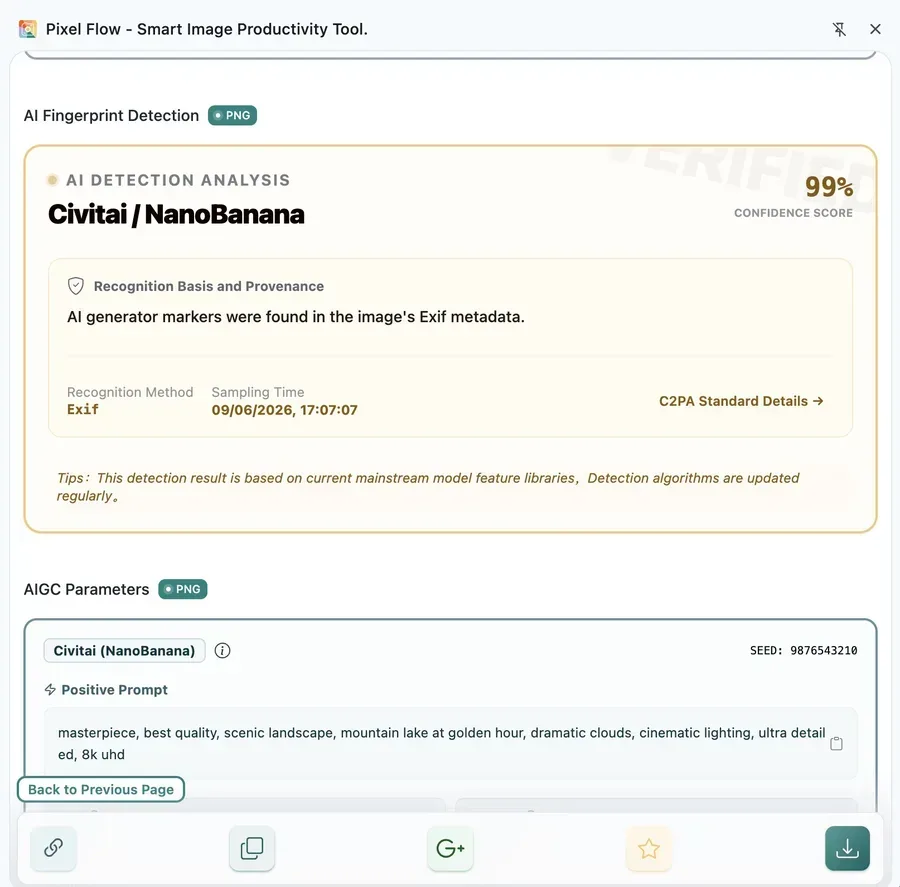
Focus on these clues:
| Clue | Question It Helps Answer | Boundary |
|---|---|---|
| Source page and image URL | Where did this image come from, and can reviewers return to its context? | Source links are not authorization files |
| Image format and dimensions | Does it meet baseline requirements for labeling, training, or QA? | Passing size checks does not mean rights are cleared |
| Alt text | Did the page provide a description of the image content? | Alt text may be empty, outdated, or wrong |
| AI fingerprint detection | Does the current file contain generative-AI or editing-tool clues? | No detection result does not prove the image is not AI-generated |
| AIGC parameters | Did the file retain prompts, model names, seeds, or workflow clues? | Parameters do not prove the image can be replicated or used commercially |
| Camera and editing metadata | Are there camera, capture time, software, creator, or copyright fields? | Metadata can be stripped, compressed, rewritten, or falsified |
This area involves image technical standards and specifications. For example, Exif is commonly used for camera and capture parameters, XMP / IPTC for descriptions, creators, and copyright fields, and C2PA for content provenance and change-history credentials. Pixel Flow can only read clues that still exist in the current file or current page. If a platform has stripped or rewritten them, the tool cannot invent missing data. For broader context, see Responsible Use and AI Fingerprint Detection.
How Exported Inventories Support Team Review
In dataset scenarios, export an inventory before deciding whether to download image files. A Pixel Flow inventory works well as the first candidate-pool ledger: data, labeling, rights, and project owners can review the same fields, statuses, and pending questions before deciding which images should enter cleaning, labeling, rights review, or exclusion.

At minimum, keep these fields:
| Field | Why It Matters |
|---|---|
| Source page URL | Lets reviewers return to the image context and page terms |
| Original image URL | Confirms whether the local file matches the web resource |
| Site name and page title | Helps identify the page scenario |
| Image Alt text | Helps understand the description provided by the page |
| Image format, width, height | Supports filtering against task requirements |
| Custom tags | Records project, category, quality, and review status |
| Copyright/creator information | If present in the file, reminds the team to continue review |
| Usage reminder | Makes clear that the inventory does not authorize use |
| Capture time, favorite time, download time | Preserves the handling chain for later tracing |
If images will enter formal labeling or pre-training review, add fields such as reviewer, authorization-material location, license type, whether training is allowed, whether redistribution is allowed, whether people or sensitive information appear, and final handling decision.
How Download and Archiving Preserve the Review Chain
After the candidate scope passes initial review, downloading the image files is safer. By default, Pixel Flow saves images together with Source and Rights Clue Records. If you use the full information sheet, you can also keep more management fields and metadata clues. Later, even if the image leaves the webpage, you can still match the file, source page, tag status, and review decision.
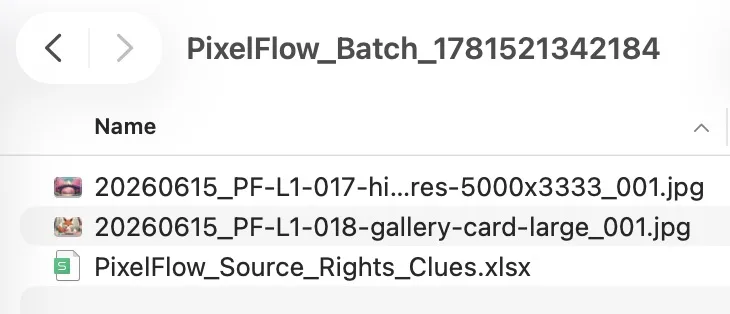
A safer dataset-candidate archive package usually includes:
- Image files.
- The source inventory exported from Pixel Flow.
- Source page screenshots or saved page records.
- Authorization files, license text, client confirmation, or internal approval records.
- Tag definitions and field definitions.
- Labeling guidelines, cleaning rules, and exclusion rules.
- Final usage location or dataset version notes.
If the source page becomes unavailable later, the source address, image URL, download time, and screenshots in the inventory become more valuable. But an unavailable link still does not replace authorization files, and it does not prove that an image may continue to be used for training or distribution.
Avoid This
- Do not organize images from pages you are not authorized to access, pages that require login or payment, or pages that clearly restrict scraping.
- Do not add third-party webpage images directly to a training dataset only because the browser can see or download them.
- Do not rely on AI fingerprint detection, AIGC parameters, Exif, XMP, IPTC, or C2PA clues as the final rights decision.
- Do not treat statuses such as
favorited,downloaded, orexportedas conclusions that the image is trainable or commercially usable. - Do not place images containing people, trademarks, license plates, geolocation, medical or financial information, minors, or other sensitive content into a dataset without authorization evidence.
- Do not clean up favorites, download history, or source clues that are still under review unless you have completed backup and archiving.
Learn More
- Responsible Use: understand the difference between source clues, evidence, and authorization.
- Source and Rights Clue Records: learn which review fields can be attached to downloads.
- Export Image Inventory: turn candidate images into a reviewable team spreadsheet.
- Favorite Images and Organize with Tags: use tags to maintain project, category, and review status.
- AI Fingerprint Detection: understand the use and limits of AI generation clues.
- Data Safety, Backup, and Cleanup: keep required records before cleanup or device migration.
FAQ
Q: Can Pixel Flow decide whether an image can be used for training?
No. Pixel Flow helps organize candidate images, source pages, image URLs, tags, technical clues, and exported inventories. Training permission requires your review of source terms, licenses, contracts, client confirmation, likeness rights, privacy, and your team’s compliance process.
Q: Should dataset candidates be downloaded first or exported first?
Export the inventory first. An inventory is better for scope confirmation, rights review, and team handoff. After review confirms which images can continue, download the files and archive them with source records.
Q: Can AI fingerprint detection exclude all AI-generated images?
No. Detection results can be affected by screenshots, compression, platform transcoding, re-exporting, and metadata stripping. Treat them as clues that need further confirmation, not as the only conclusion.
Q: If no copyright field is readable, does that mean the image can be used?
No. Many web images have creator, copyright, capture, and similar information stripped during upload, compression, cropping, transcoding, or caching. If no field is readable, it only means the current image has no readable clue data. It does not mean the image has no copyright, and it does not mean you can train on or distribute it.
Q: What is the difference between Free and PRO for dataset curation?
Free users can do basic capture, filtering, favorites, and default source clue records. Some batch capabilities, inventory export, AI generation clues, AIGC parameters, and full information sheets are PRO capabilities. See Free vs Pro for the detailed comparison. If you are signed in, you can also check the current account state in View PRO Status and Records.
Q: Is the inventory still useful if the source page later disappears?
Yes. It at least preserves the source page, image URL, site name, page title, capture time, and download time recorded at the time. But if you need to prove authorization, rely on authorization files, license text, client confirmation, or other verifiable materials.